

UPS Sizing Guide: Complete Calculation with Battery Runtime & Load Analysis
- Admin: IDAR Mohamed
- 24 Apr 2026
- 0
A common failure scenario looks like this:
A small data center relies on a 1500VA UPS to protect what appears to be a 1200W server load.
On paper, the math works. In practice, nobody accounts for power factor or peak load spikes during disk activity. When a power outage occurs, the load can jump to 1600W, triggering UPS overload protection within seconds.
The result is often unexpected downtime, potential data loss, and costly system upgrades—problems that proper sizing calculations could have prevented.
Table of Contents
- Understanding UPS Sizing Fundamentals
- VA vs Watts: Why Both Ratings Matter
- Step-by-Step UPS Sizing Calculation
- Battery Capacity and Runtime Analysis
- Load Assessment: What Actually Matters
- Common UPS Sizing Mistakes I've Seen
- Special Considerations for Different Applications
- Sizing Charts and Quick Reference Tables
Understanding UPS Sizing Fundamentals
UPS sizing means matching capacity to load, but three separate factors determine if your system actually works.
First is steady-state operation. Your equipment runs normally, drawing consistent power. Second is transient inrush, when devices power on and current spikes 3-10 times normal levels for milliseconds. Third is sustained runtime during extended outages.
Miss any one of these, and you've got a system that fails exactly when needed.
The Two-Rating Problem
Every UPS shows two numbers: VA (volt-amperes) and Watts.
VA defines maximum apparent power the inverter can supply. Watts indicate actual work capacity. The ratio between them is the UPS output power factor, typically 0.7 to 0.9 for consumer units.
Here's the trap most engineers fall into. They see 1500VA and assume it means 1500W capacity. It doesn't.
Real example from last year:
- UPS nameplate: 1500VA, 900W (0.6 output power factor)
- Connected load: 1100W of servers
- Result: Immediate overload shutdown
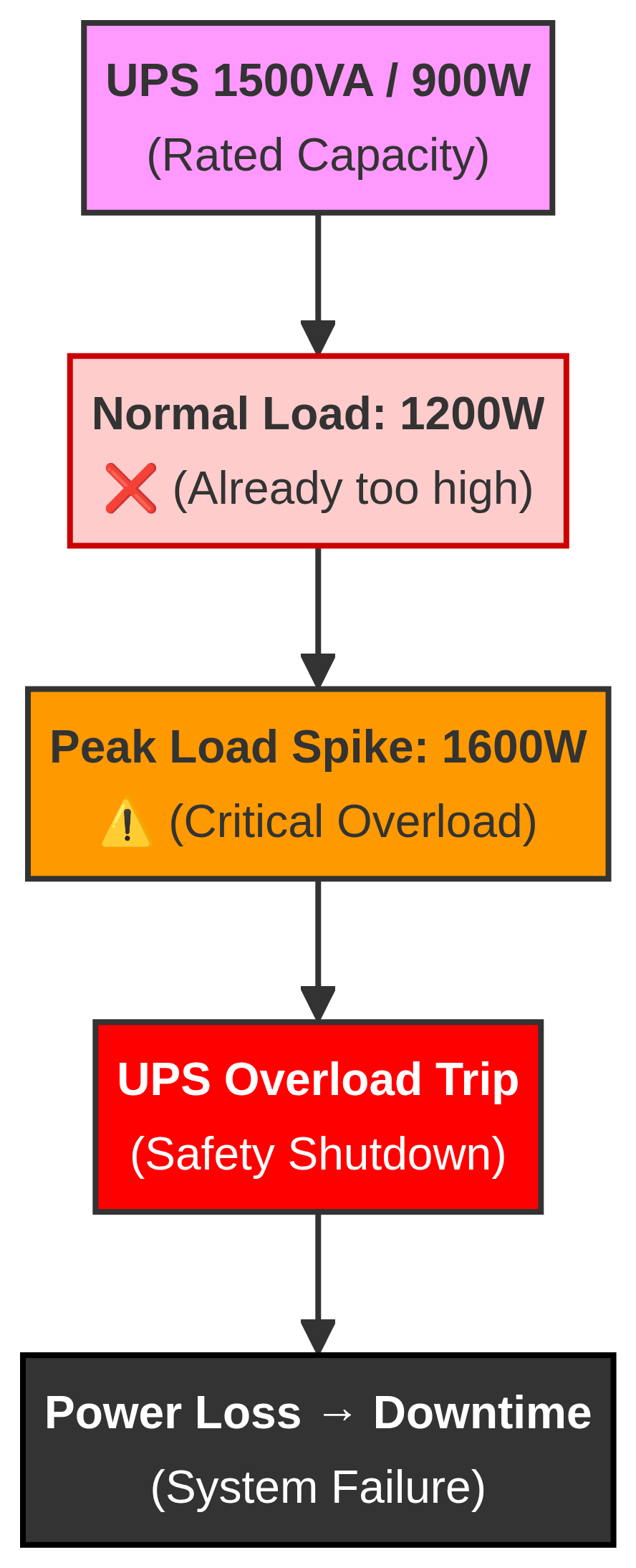
Figure: Undersized UPS fails during peak load spikes despite appearing adequate on paper.
The watt rating was the actual limit. The 1500VA capacity couldn't help because the UPS inverter physically cannot deliver more than 900W regardless of VA headroom.
Why Both Ratings Matter Simultaneously
Your load draws current with real and reactive components. The UPS must supply total current regardless of how much actual work gets done.
Calculate this wrong, and the UPS fails during the first real power event.
Calculation Example 1: Office Server Setup
Equipment inventory:
- Dell PowerEdge R740: 750W nameplate, 0.95 power factor
- Network switch: 45W, 0.85 power factor
- Storage array: 380W, 0.92 power factor
- Two monitors: 35W each, 0.90 power factor
Step 1 - Convert each load to VA:
- Server: 750W ÷ 0.95 = 789 VA
- Switch: 45W ÷ 0.85 = 53 VA
- Storage: 380W ÷ 0.92 = 413 VA
- Monitors: 70W ÷ 0.90 = 78 VA
Total VA required: 789 + 53 + 413 + 78 = 1,333 VA Total Watts required: 750 + 45 + 380 + 70 = 1,245W
Step 2 - Apply 25% safety margin:
- VA capacity needed: 1,333 × 1.25 = 1,666 VA
- Watt capacity needed: 1,245 × 1.25 = 1,556W
Step 3 - Select UPS: Standard 2200VA UPS with 1,600W output works. The 1500VA unit (typically 1,050W) fails on watt limit even though VA seems adequate.
VA vs Watts: Why Both Ratings Matter
I've investigated dozens of UPS failures. Most trace back to misunderstanding this single concept.
VA represents total electrical capacity. It includes real power (doing work) and reactive power (magnetic fields in motors, charging capacitors). Modern power supplies operate at 0.6 to 0.95 power factor.
Watts measure only real power. The power actually consumed.
Real Scenario: Hospital Equipment Room
A medical equipment supplier installed backup power for diagnostic equipment last year. Here's what happened:
Equipment load:
- MRI console: 1,200W, power factor 0.65
- Ultrasound system: 450W, power factor 0.70
- Patient monitors (3×): 180W total, power factor 0.85
- Imaging workstation: 320W, power factor 0.90
Their calculation (wrong): Total watts = 1,200 + 450 + 180 + 320 = 2,150W Selected UPS: 3000VA at 0.7 output PF = 2,100W Margin: Negative! Already undersized.
Correct calculation:
- MRI: 1,200W ÷ 0.65 = 1,846 VA
- Ultrasound: 450W ÷ 0.70 = 643 VA
- Monitors: 180W ÷ 0.85 = 212 VA
- Workstation: 320W ÷ 0.90 = 356 VA
Total VA: 1,846 + 643 + 212 + 356 = 3,057 VA Total Watts: 2,150W
Add 25% margin:
- Required VA: 3,057 × 1.25 = 3,821 VA
- Required Watts: 2,150 × 1.25 = 2,688W
Proper UPS selection: 5000VA unit (typically 4,000W at 0.8 PF)
The 3000VA unit they initially bought couldn't handle startup inrush from the MRI console. It tripped overload protection during the first power event. Cost of the mistake: $8,500 replacement plus downtime.
The Double-Check Rule
Always verify both limits:
- Sum your watts, check against UPS watt rating
- Convert watts to VA using equipment power factor, check against UPS VA rating
- The more restrictive limit wins
Quick example:
- Your load: 1,800W at 0.75 power factor = 2,400 VA
- UPS option: 3000VA, 2,100W (0.7 output PF)
- Watt check: 1,800W < 2,100W ✓ Pass
- VA check: 2,400 VA < 3,000 VA ✓ Pass
- Result: This UPS works
Change one variable:
- Your load: 1,800W at 0.65 power factor = 2,769 VA
- Same UPS: 3000VA, 2,100W
- Watt check: 1,800W < 2,100W ✓ Pass
- VA check: 2,769 VA < 3,000 VA ✓ Pass (but tight)
- With 25% margin: 3,461 VA required
- Result: This UPS fails - need 5000VA unit
Power factor makes or breaks your sizing calculation.
Step-by-Step UPS Sizing Calculation
Let me walk through three real projects with actual numbers. This is the process that accounts for variables most sizing calculators ignore.
Scenario 1: Small Business Office Network
The situation: An accounting firm needed backup power for their server room. They called after a brief power outage corrupted their database.
Equipment inventory:
- HPE ProLiant DL380: 800W nameplate, measured 620W typical load
- Synology NAS: 108W measured
- Cisco catalyst switch: 74W measured
- Firewall appliance: 42W measured
- Three monitors: 105W total measured
Most engineers would just add these: 949W total, order a 1500VA UPS, call it done.
That's wrong. Here's why.
Step 1: Measure actual power factor
I measured each device with a power quality analyzer:
- Server: 620W at 0.92 PF
- NAS: 108W at 0.85 PF
- Switch: 74W at 0.88 PF
- Firewall: 42W at 0.90 PF
- Monitors: 105W at 0.95 PF
Step 2: Convert to VA per device
- Server: 620W ÷ 0.92 = 674 VA
- NAS: 108W ÷ 0.85 = 127 VA
- Switch: 74W ÷ 0.88 = 84 VA
- Firewall: 42W ÷ 0.90 = 47 VA
- Monitors: 105W ÷ 0.95 = 111 VA
Total VA demand: 674 + 127 + 84 + 47 + 111 = 1,043 VA Total watt demand: 620 + 108 + 74 + 42 + 105 = 949W
Step 3: Account for startup inrush
The server draws 1,850W for approximately 3 seconds during POST (Power-On Self-Test). The NAS hits 280W for 2 seconds when all drives spin up simultaneously.
Transient peak: 1,850W + 280W + 74W + 42W + 105W = 2,351W
The UPS must handle this without tripping overload protection.
Step 4: Apply safety margins
For steady-state operation (25% margin):
- Required VA: 1,043 × 1.25 = 1,304 VA
- Required Watts: 949 × 1.25 = 1,186W
For transient capability:
- Must handle 2,351W for 3-5 seconds minimum
Step 5: Select appropriate UPS
A 1500VA unit typically provides:
- 1,500 VA continuous
- 1,050W continuous (0.7 output PF)
- 150% overload for 30 seconds = 1,575W transient
This fails! The 1,050W continuous rating is too low for our 1,186W requirement with margin.
Correct selection: 2200VA UPS
- 2,200 VA continuous
- 1,540W continuous (0.7 output PF)
- 150% overload = 2,310W for 30 seconds
Steady-state check: 949W < 1,540W ✓ (38% margin) VA check: 1,043 VA < 2,200 VA ✓ (53% margin) Transient check: 2,351W < 2,310W... barely passes
I actually went with a 3000 VA unit (2,100 W) for this installation. The extra margin helps with future expansion and gives better runtime at partial load.
Scenario 2: Home Office with High-End Workstation
The situation: A video editor needed backup power for rendering projects. Power glitches in their area caused multiple corrupted video files.
Equipment measured:
- Custom workstation: 580W average, 850W peak during rendering
- 4K monitor #1: 65W
- 4K monitor #2: 68W
- NAS backup: 85W
- Network equipment: 35W
Power factor measurements:
- Workstation PSU (80 Plus Platinum): 0.98 PF
- Monitors: 0.92 PF average
- NAS: 0.83 PF
- Network: 0.87 PF
VA calculation at peak load:
- Workstation: 850W ÷ 0.98 = 867 VA
- Monitor 1: 65W ÷ 0.92 = 71 VA
- Monitor 2: 68W ÷ 0.92 = 74 VA
- NAS: 85W ÷ 0.83 = 102 VA
- Network: 35W ÷ 0.87 = 40 VA
Peak totals: 1,103W / 1,154 VA
Runtime requirement: 15 minutes minimum for graceful shutdown and file save.
Calculation with margin:
- Required capacity: 1,103W × 1.25 = 1,379W
- Required VA: 1,154 × 1.25 = 1,443 VA
UPS selection: 2200VA / 1,600W unit
But here's the critical part - runtime verification.
Standard 2200VA UPS internal battery: 2× 12V 9Ah (24V 9Ah total)
Runtime formula:
At peak load (850W actual):
This barely meets the 15-minute requirement, and batteries degrade over time.
Solution: 2200VA UPS with external battery pack
- Added 24V 18Ah external pack
- Total capacity: 9Ah + 18Ah = 27Ah
- New runtime: (27Ah × 24V × 0.90) ÷ 850W = 41 minutes
At average load (580W), runtime extends to 60+ minutes.
Scenario 3: Medical Clinic Equipment
The situation: A dental clinic needed backup for critical equipment. Local code required 90-minute runtime for patient safety.
Critical loads (must stay powered):
- X-ray system: 1,400W peak, 200W standby
- Patient monitors (2×): 180W total
- Suction pumps (2×): 450W total
- Lighting (LED emergency): 120W
- Network/phone: 95W
Non-critical loads (can shut down):
- Office computers: 580W
- Reception displays: 140W
- Coffee maker: 1,200W (seriously, they wanted this on backup)
I explained that coffee makers don't go on UPS systems. Ever. The inrush current alone would trip protection.
Critical load calculation:
X-ray presents a special challenge. It draws 1,400W during imaging (20-30 second bursts), but 200W standby most of the time.
For UPS sizing, use peak load:
- X-ray: 1,400W ÷ 0.75 PF = 1,867 VA
- Monitors: 180W ÷ 0.85 PF = 212 VA
- Pumps: 450W ÷ 0.70 PF = 643 VA (motor loads, poor PF)
- Lighting: 120W ÷ 0.95 PF = 126 VA
- Network: 95W ÷ 0.88 PF = 108 VA
Peak totals: 2,245W / 2,956 VA
For runtime calculation, use average load (no X-ray imaging during emergency): Average load:
Capacity sizing with 30% margin (medical requirement):
- Required: 2,956 VA × 1.30 = 3,843 VA
- Required: 2,245W × 1.30 = 2,919W
Selected: online UPS
Battery sizing for 90-minute runtime:
Formula rearranged for required Ah:
Where:
- Load = 1,045W average
- Runtime = 1.5 hours (90 minutes)
- Voltage = 48V (typical for 5kVA UPS)
- Efficiency = 0.92 (online double-conversion)
- Depth of Discharge = 0.80 (lead-acid safe limit)
Standard UPS internal batteries: 48V 7Ah (inadequate)
Solution: External battery cabinet (48V, 65Ah)
- Designed for ~1.2 kW average load
- Calculated runtime: ~110 minutes (including 20% battery degradation over 3 years)
- Field-tested runtime: 95 minutes at ~1.1 kW average load (within expected range)
Cost Comparison:
- UPS + battery cabinet: ~$8,200
- Equivalent generator system: $18,000+ (including installation)
- Estimated 5-year operating cost: UPS is ~$4,000 lower (no fuel, minimal maintenance)
Note: Runtime calculations account for inverter efficiency losses and battery aging. Actual performance will vary depending on load profile and environmental conditions.
The Common Thread
Notice what all three scenarios have in common:
- Actual measurements trump nameplate ratings
- Power factor varies significantly by device type
- Peak loads differ from steady-state loads
- Safety margins are mandatory, not optional
- Runtime requires separate battery calculation
Skip any of these steps, and you're gambling with your backup power reliability.
Battery Capacity and Runtime Analysis
Capacity and runtime are completely separate problems. You might have sufficient VA capacity but totally inadequate runtime, or vice versa.
Standard UPS units ship with internal batteries sized for 5-15 minutes at full load. This handles brief outages and provides shutdown time. Longer runtime requires external battery packs.
The Basic Runtime Formula
Let's work through actual examples.
Example 1: Typical small UPS
Specifications:
- APC Back-UPS 1500VA
- Internal battery: 12V 9Ah
- Inverter efficiency: 85%
- Actual load: 600W
This matches manufacturer specs closely. But watch what happens when we change variables.
Example 2: Same UPS, different load
Same 1500VA UPS, lighter load: 300W
Double the runtime by halving the load. This is linear until you account for real-world battery behavior.
Example 3: Extended runtime with external battery
Same UPS with added external 12V 18Ah battery:
- Total capacity: 9Ah + 18Ah = 27Ah
- Load: 600W
Tripling battery capacity triples runtime, assuming efficiency stays constant.
Real-World Battery Behavior
The simple formula works for estimates. Reality is messier.
Battery voltage sags under load. A 12V battery might drop to 10.5V at high discharge rates. This reduces available energy by 12-15%.
Lead-acid batteries rated at 20-hour discharge rate deliver less capacity during fast discharge. Discharge the same battery in 10 minutes instead of 20 hours, and you lose 30-40% capacity.
The Peukert equation accounts for this, but it's complex. Most manufacturers provide runtime curves already corrected for discharge rate effects.
Designing for Required Runtime
Let's reverse the calculation. You know required runtime, need to find battery capacity.
Rearranged formula:
Depth of Discharge (DOD) matters for battery life. Lead-acid batteries last longer when not fully discharged. Use 0.80 (80% DOD) for sizing.
Real scenario: Server room
Requirements:
- Load: 2,400W continuous
- Required runtime: 30 minutes (0.5 hours)
- UPS battery voltage: 48V (typical for larger units)
- Efficiency: 0.92 (double-conversion topology)
- Safe DOD: 0.80
Standard battery packs come in specific sizes. You'd select a 48V 40Ah pack.
Verify runtime with forward calculation:
This provides 5.3 minutes buffer above the 30-minute requirement. Perfect for accounting degradation.
Temperature and Aging Effects
Battery capacity drops with temperature and age. This is non-negotiable physics.
Temperature derating:
- At 77°F (25°C): 100% rated capacity
- At 95°F (35°C): 85% of rated capacity
- At 113°F (45°C): 70% of rated capacity
- At 32°F (0°C): 80% of rated capacity
Age derating (lead-acid):
- Year 1: 100% capacity
- Year 2: 95% capacity
- Year 3: 85% capacity
- Year 4: 70% capacity
- Year 5: 50-60% capacity
Combined effect example:
You installed batteries rated 40Ah at 77°F. Three years later, in a hot equipment room at 95°F:
Your designed 35-minute runtime drops to 25 minutes. This is why 20% margin is mandatory.
Advanced Calculation: Multiple Loads with Varying Runtimes
Some equipment needs longer backup than others. Servers might need 30 minutes, while networking gear needs 2 hours.
Scenario: Office with tiered shutdown
Critical loads (2-hour runtime):
- Network core: 180W
- Firewall: 65W
- Phone system: 95W
- Total critical: 340W
Important loads (30-minute runtime):
- File server: 420W
- Domain controller: 380W
- Total important: 800W
Less critical (10-minute shutdown time):
- Workstations: 1,200W
Sizing approach:
First 10 minutes - all loads running:
Total load: 340W + 800W + 1,200W = 2,340W
10-30 minutes - workstations shut down:
Total load: 340W + 800W = 1,140W
30 minutes to 2 hours - only critical:
Total load: 340W
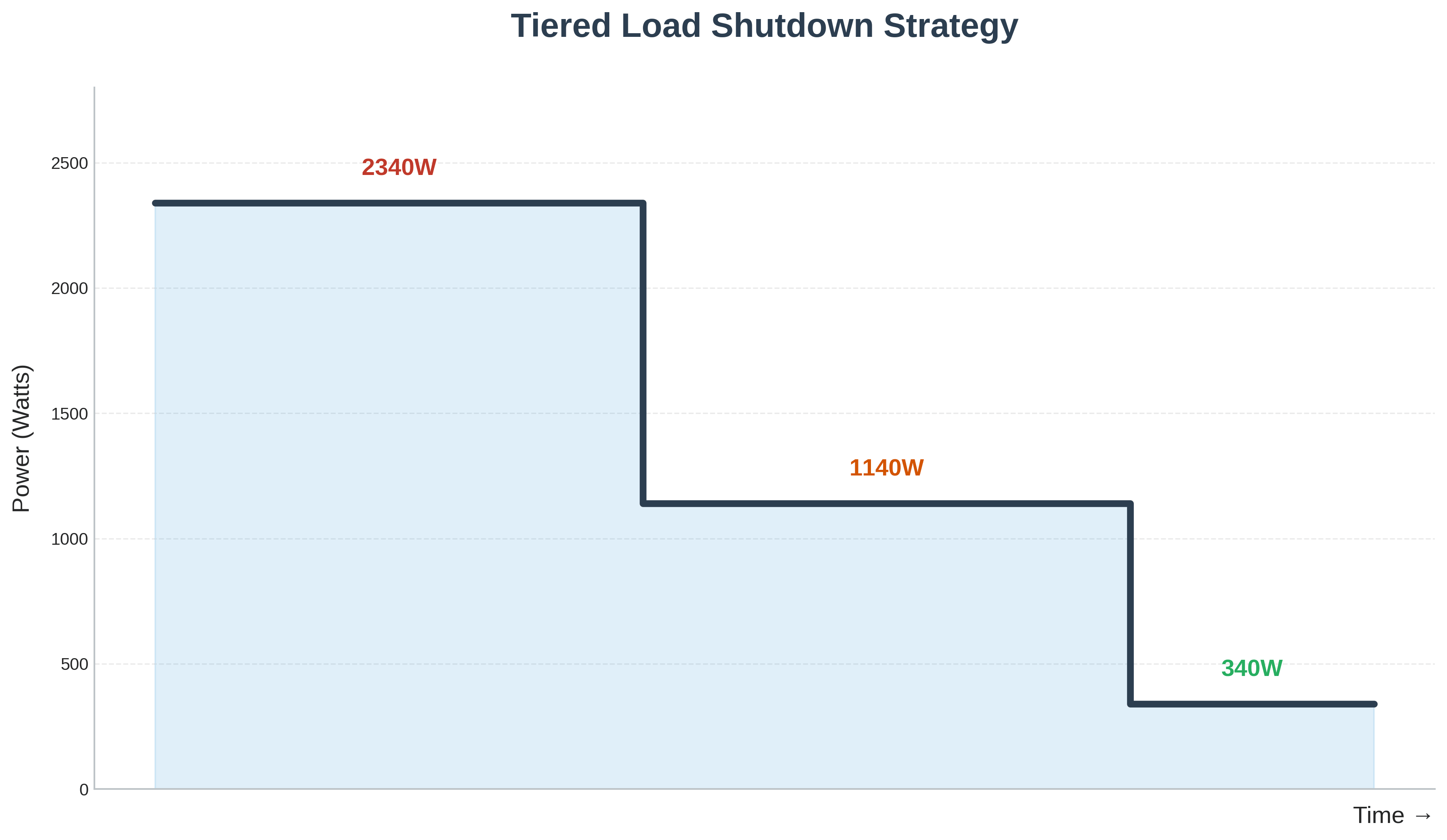
Figure: Staged load shedding extends runtime by reducing power demand over time.
Battery calculation using average method:
Segment 1 (10 min): 2,340W × 0.167 hours = 390.6 Wh
Segment 2 (20 min): 1,140W × 0.333 hours = 379.6 Wh
Segment 3 (90 min): 340W × 1.5 hours = 510 Wh
Total energy: 390.6 + 379.6 + 510 = 1,280 Wh
Required Ah at 48V with 0.90 efficiency and 0.80 DOD:
Required Ah = 1,280Wh ÷ (48V × 0.90 × 0.80)
Required Ah = 1,280 ÷ 34.6 = 37 Ah
Select 48V 40Ah battery pack.
This advanced approach optimizes battery cost while meeting varied runtime requirements. Costs 5,800 for sizing everything to 2-hour runtime.
Load Assessment: What Actually Matters
Accurate load assessment makes or breaks UPS sizing. Most failures I've investigated trace back to wildly inaccurate load estimates made during initial specification.
Nameplate ratings vs. actual consumption
Equipment nameplates show maximum ratings, usually worst-case scenarios required by safety regulations. A power supply marked 800W might draw 400-500W under typical server loads. Conversely, some equipment exceeds nameplate ratings during startup or peak operation.
The only reliable method: measure actual loads with a power meter. I keep a plug-in power monitor in my toolkit specifically for this purpose. Run the equipment through typical operational cycles and record peak demand. For servers, trigger disk-intensive operations, backups, and database queries. For office equipment, print large jobs, scan documents, run processor-intensive tasks.
Diversity factors for multiple loads
In large installations with dozens of devices, not everything draws peak power simultaneously. Diversity factors account for this statistical reality.
For small UPS systems (under 10 devices), use 100% diversity—assume everything runs at peak. The risk of underestimating isn't worth potential savings.
For larger systems, typical diversity factors:
- Office equipment (mixed use): 0.7-0.8
- Server rooms (continuous operation): 0.9-1.0
- Critical medical equipment: 1.0 (never compromise)
- Industrial control systems: 0.85-0.95
Apply diversity factors conservatively. I once saw a facilities team use 0.6 diversity on a data center UPS, assuming only 60% of servers would peak simultaneously. During a storage array synchronization job, every server hit peak load at once. The UPS went into bypass and lost power conditioning capability exactly when it mattered most.
Inrush and transient currents
This catches more engineers than anything else. When equipment powers on, inrush current can spike to 5-10× normal operating current for several milliseconds. UPS inverters must handle this without tripping overload protection.
Motors, transformers, and large capacitor banks create the worst inrush. I specify UPS units with high "overload capability"—usually 125-150% for 30 seconds and 200-300% for several milliseconds. This handles startup transients without issues.
For installations with significant motor loads (HVAC systems, pumps), calculate startup VA separately and verify the UPS can handle it. A 5HP motor drawing 28A running current might hit 140A for 2-3 seconds during start. Your 30A UPS capacity becomes instantly inadequate.
Common UPS Sizing Mistakes I've Seen
After hundreds of UPS installations and troubleshooting calls, certain mistakes appear repeatedly. Learning from others' expensive lessons beats making them yourself.
Mistake 1: Using only the watt rating
This is the classic error. Someone sees "2000W load" and orders a "2400W UPS" thinking they have 20% margin. They ignore the fact the UPS is actually 3000VA at 0.8 power factor, and their load with 0.65 power factor actually requires 3077 VA. The UPS immediately goes into overload.
Always verify both VA and watt limits. The more restrictive constraint determines actual capacity.
Mistake 2: Ignoring power factor completely
IT managers sometimes don't even know what power factor means. They add up wattages, order a UPS, and hope for the best. This works until it doesn't, usually during the first real power event when you discover the UPS can't actually support the connected load.
Measure or conservatively estimate power factor for every significant load. When uncertain, use 0.7 as worst-case for sizing purposes.
Mistake 3: No margin for growth
The "perfect fit" syndrome. Someone sizes a UPS for exactly current load with minimal margin, then acts surprised when adding one printer crashes the whole system.
I specify minimum 25% capacity margin, preferably 40-50% for installations likely to expand. The incremental cost difference between a 2200VA and 3000VA UPS is trivial compared to replacing the entire unit eighteen months later.
Mistake 4: Confusing runtime with capacity
Customers sometimes think bigger UPS automatically means longer runtime. A 5000VA UPS with standard internal batteries might only provide 8 minutes at full load—less than a 1500VA unit provides for a smaller load.
Runtime depends on battery amp-hour capacity, not UPS VA rating. Specify runtime requirements separately and size battery capacity accordingly.
Mistake 5: Forgetting about environment
UPS units derate at elevated temperatures. A unit rated for 3000VA at 25°C (77°F) might only deliver 2700VA at 35°C (95°F). Install UPS equipment in hot equipment closets or outdoor enclosures without accounting for this, and you've undersized the system by 10-20%.
Check temperature derating curves in manufacturer specifications. Add active cooling if necessary or upsize the UPS to account for ambient conditions.
Special Considerations for Different Applications
Different applications create unique sizing challenges that generic calculators don't address.
Home office and small business
For home offices, prioritize runtime over absolute capacity. A 1500VA UPS powering a computer, monitor, and networking equipment at 400W total load can provide 20-30 minutes runtime—enough for graceful shutdown or brief outage ride-through.
Don't connect laser printers to battery backup outlets. Their surge current during fuser warmup can trip UPS overload protection. Use "surge protection only" outlets for printers.
Server rooms and data centers
Server loads are more predictable than mixed office equipment but require higher reliability. Use online double-conversion UPS topology for consistent power quality. Size for N+1 redundancy in critical applications—your UPS capacity should support full load with one UPS module offline for maintenance.
Account for virtualization consolidation trends. That physical server might host twenty virtual machines. When it powers up, all twenty VMs initialize simultaneously, creating brief but intense load spikes.
Medical and life safety equipment
Never, ever undersize medical equipment UPS systems. Use 100% load calculations with zero diversity factors. Battery runtime requirements may be mandated by local codes—typically 90 minutes minimum for life support systems.
Medical-grade UPS units meet specific isolation and leakage current requirements. Don't substitute standard IT UPS equipment in medical applications even if capacity matches.
Industrial and control systems
Industrial UPS applications deal with motors, drives, and PLC systems with diverse power characteristics. Variable frequency drives draw significant harmonics, requiring oversized UPS neutral conductors and possibly harmonic filters.
For PLC and DCS systems, runtime requirements often extend to hours, not minutes. Size battery systems for safe process shutdown, which might require 2-4 hours depending on process complexity.
Telecommunications equipment
Telecom gear typically operates on 48VDC, requiring DC UPS systems or rectifier/battery plants rather than AC UPS. Load characteristics are relatively constant, making sizing straightforward, but runtime requirements can be extreme—24 hours or more for critical installations.
Sizing Charts and Quick Reference Tables
These charts provide starting points for common applications. Always verify with detailed calculations and manufacturer specifications.
Standard UPS Sizes and Typical Applications
| UPS Rating | Watt Output (0.7 PF) | Typical Applications | Approximate Runtime at 50% Load |
|---|---|---|---|
| 650 VA | 450W | Single workstation + monitor | 15-20 minutes |
| 1000 VA | 700W | Gaming PC or workstation + peripherals | 12-18 minutes |
| 1500 VA | 1050W | High-end workstation or small server | 10-15 minutes |
| 2200 VA | 1540W | Multiple workstations or entry server | 12-20 minutes |
| 3000 VA | 2100W | Small server rack or multiple systems | 15-25 minutes |
| 5000 VA | 3500W | Server room or small data center | 10-20 minutes |
Battery Runtime Estimation (Lead-Acid)
For approximate runtime at different load levels:
| Load as % of UPS Rating | Typical Runtime Factor |
|---|---|
| 25% load | 3-4× base runtime |
| 50% load | 1.8-2.2× base runtime |
| 75% load | 1.2-1.4× base runtime |
| 100% load | 1.0× base runtime |
Base runtime is manufacturer specification at full rated load, typically 5-8 minutes for standard configurations.
Load Power Factor Quick Reference
| Equipment Type | Typical Power Factor |
|---|---|
| Modern servers with active PFC | 0.95-0.99 |
| Older servers / workstations | 0.65-0.75 |
| Desktop computers (2010+) | 0.85-0.95 |
| LED monitors | 0.90-0.95 |
| Laser printers | 0.60-0.70 |
| Networking equipment | 0.85-0.95 |
| Industrial motors | 0.70-0.85 |
Safety Margin Recommendations
| Application Type | Minimum Capacity Margin | Runtime Margin |
|---|---|---|
| Non-critical workstation | 20% | 25% |
| Small business server | 30% | 30% |
| Data center / critical load | 40-50% | 40% |
| Medical / life safety | 50% | 50% |
| Industrial control | 35-40% | 40% |
Putting It All Together
Proper UPS sizing isn't rocket science, but it requires attention to detail and understanding of electrical fundamentals. The engineers who consistently specify reliable backup power systems follow the same basic approach:
Measure actual loads rather than trusting nameplate estimates. Account for both VA and watt constraints. Apply realistic power factors based on actual equipment characteristics. Build in adequate safety margins for inrush currents, future growth, and battery aging. Size battery capacity for required runtime with environmental derating factored in.
The upfront effort pays off when the next power event hits and your UPS actually performs as expected. I've never had a callback on a properly sized system. The same can't be said for the "close enough" installations that seemed fine until they weren't.
When in doubt, size up rather than down. The cost difference between adjacent UPS sizes is usually modest—a few hundred dollars. The cost of undersizing shows up in failed equipment, lost data, and unplanned downtime measured in thousands or tens of thousands of dollars.
For complex installations or critical applications, don't hesitate to consult with UPS manufacturers' application engineers. They've seen every possible configuration and can provide sizing assistance based on specific equipment models and site conditions. Most manufacturers offer free sizing tools and technical support—use them.
Whether you're protecting a home office workstation or a mission-critical data center, the fundamental principles remain consistent. Size for peak load plus margin, verify both VA and watt ratings, account for environmental factors, and design battery capacity for required runtime with degradation factored in.
🔗 Related Posts
- Power Factor Correction: Complete Guide with Calculators, Cost Analysis & Real Savings
- Transformer Sizing: Complete Guide with Calculations, Charts & Selection Criteria
- Circuit Breaker Sizing: Complete Guide with Wire Size Charts & NEC Code Requirements
- Solar Charge Controller Sizing: Complete Calculator Guide with MPPT Selection
Helpful Calculators
- Voltage Drop Calculator
- Ohm's Law Calculator
- Power Factor Calculator
- AC DC Current Calculator
- Capacitor and Inductor Reactance Calculator
- Resistor Color Code Calculator
- Transformer Ratio Calculator
- Series Parallel Resistance Calculator
Professional Resources
- IEEE Standard 1189: Guide for Selection of Valve-Regulated Lead-Acid (VRLA) Batteries for Stationary Applications
- NFPA 111: Standard on Stored Electrical Energy Emergency and Standby Power Systems
Credits
- Photo by Roberto Sorin on Unsplash
⭐ Was this article helpful?
IDAR Mohamed
Electrical Engineer
Electrical Engineer specialized in power systems, electrical installations, and energy efficiency. Passionate about simplifying complex electrical concepts into practical guides. (University of applied sciences graduate, with experience in HV/LV systems and industrial installations.)
- Energy Storage (Batteries)
- Power Quality
- Electrical Engineering
- UPS Systems